# Windows L2TP/IPsec VPN Client Configuration

<p class="callout info">For Windows 8, 10, 11</p>

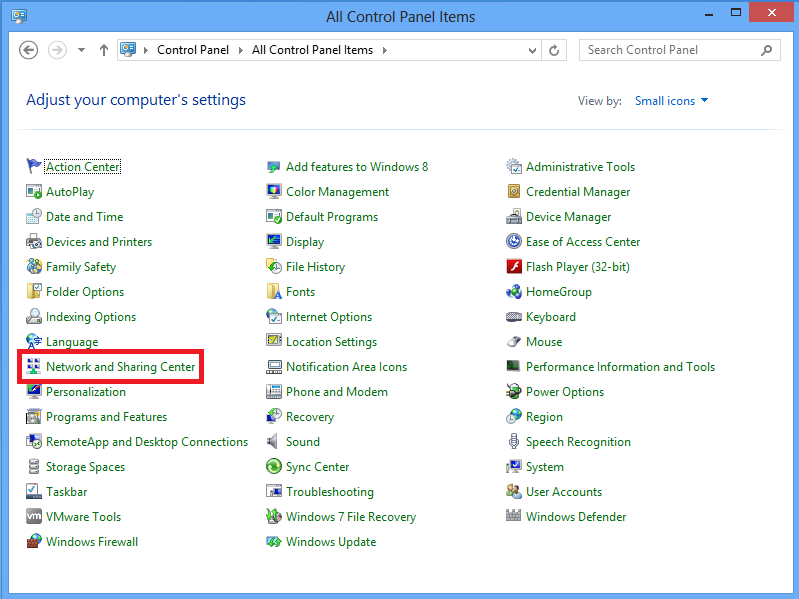
##### <span style="font-size: 10.5pt; font-family: Arial; color: #58585b; background-color: transparent; font-weight: 400; font-style: normal; font-variant: normal; text-decoration: none; vertical-align: baseline; white-space: pre-wrap;">**1**. Open **Control panel** and select **Network and Sharing center**.</span>

<span style="font-size: 10.5pt; font-family: inherit; color: #6f53bc; background-color: transparent; font-weight: 400; font-style: normal; font-variant: normal; text-decoration: none; vertical-align: baseline; white-space: pre-wrap;"><span style="border: none; display: inline-block; overflow: hidden; width: 577px; height: 433px;">[![L2TP_1.png](https://wiki.rackcorp.com/uploads/images/gallery/2022-01/scaled-1680-/kiHB52xfTg0uQaIV-l2tp-1.png)](https://wiki.rackcorp.com/uploads/images/gallery/2022-01/kiHB52xfTg0uQaIV-l2tp-1.png)</span></span>

---

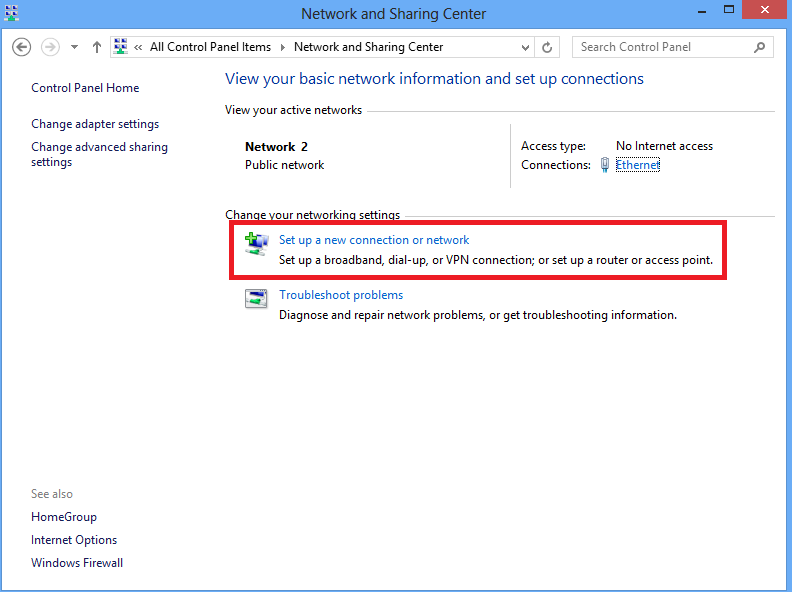
##### <span style="font-size: 10.5pt; font-family: Arial; color: #58585b; background-color: transparent; font-weight: 400; font-style: normal; font-variant: normal; text-decoration: none; vertical-align: baseline; white-space: pre-wrap;">**2**. Choose </span><span style="font-size: 10.5pt; font-family: inherit; color: #58585b; background-color: transparent; font-weight: bold; font-style: normal; font-variant: normal; text-decoration: none; vertical-align: baseline; white-space: pre-wrap;">Set up a new connection or network </span><span style="font-size: 10.5pt; font-family: Arial; color: #58585b; background-color: transparent; font-weight: 400; font-style: normal; font-variant: normal; text-decoration: none; vertical-align: baseline; white-space: pre-wrap;">option.</span>

<span style="font-size: 10.5pt; font-family: inherit; color: #6f53bc; background-color: transparent; font-weight: 400; font-style: normal; font-variant: normal; text-decoration: none; vertical-align: baseline; white-space: pre-wrap;"><span style="border: none; display: inline-block; overflow: hidden; width: 578px; height: 432px;">[![image11.png](https://wiki.rackcorp.com/uploads/images/gallery/2022-01/scaled-1680-/M8JrZRrpegssGNXR-image11.png)](https://wiki.rackcorp.com/uploads/images/gallery/2022-01/M8JrZRrpegssGNXR-image11.png)</span></span>

---

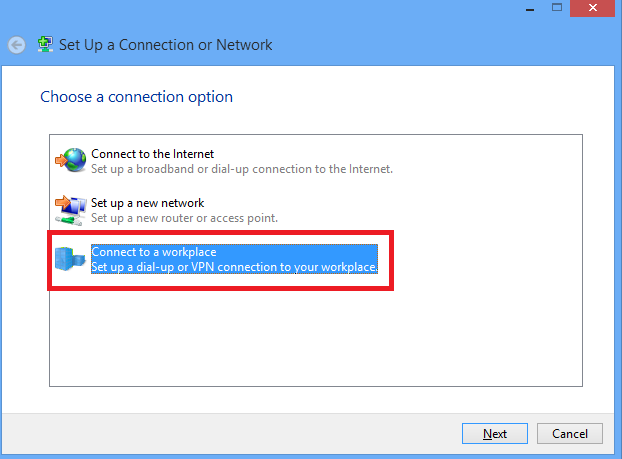
##### <span style="font-size: 10.5pt; font-family: Arial; color: #58585b; background-color: transparent; font-weight: 400; font-style: normal; font-variant: normal; text-decoration: none; vertical-align: baseline; white-space: pre-wrap;">**3**. Choose <span style="font-size: 10.5pt; font-family: inherit; color: #58585b; background-color: transparent; font-weight: bold; font-style: normal; font-variant: normal; text-decoration: none; vertical-align: baseline; white-space: pre-wrap;">Connect to a workplace</span><span style="font-size: 10.5pt; font-family: Arial; color: #58585b; background-color: transparent; font-weight: 400; font-style: normal; font-variant: normal; text-decoration: none; vertical-align: baseline; white-space: pre-wrap;"> option and click </span><span style="font-size: 10.5pt; font-family: inherit; color: #58585b; background-color: transparent; font-style: normal; font-variant: normal; text-decoration: none; vertical-align: baseline; white-space: pre-wrap;">Next.</span></span>

<span style="font-size: 10.5pt; font-family: inherit; color: #6f53bc; background-color: transparent; font-weight: 400; font-style: normal; font-variant: normal; text-decoration: none; vertical-align: baseline; white-space: pre-wrap;"><span style="border: none; display: inline-block; overflow: hidden; width: 578px; height: 427px;">[![image8.png](https://wiki.rackcorp.com/uploads/images/gallery/2022-01/scaled-1680-/X1aE0pZzkZjGafav-image8.png)](https://wiki.rackcorp.com/uploads/images/gallery/2022-01/X1aE0pZzkZjGafav-image8.png)</span></span>

---

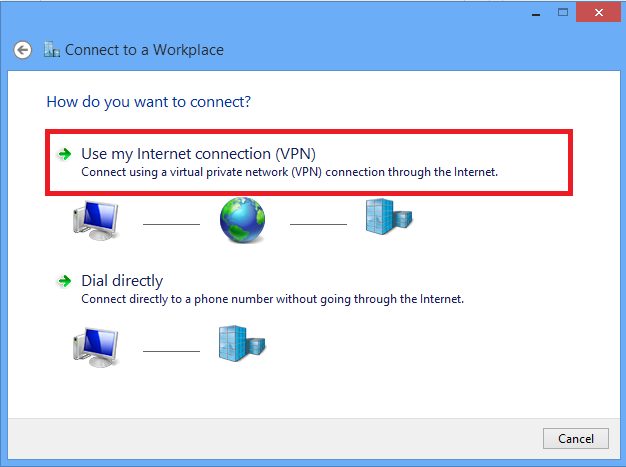
##### <span style="font-size: 10.5pt; font-family: Arial; color: #58585b; background-color: transparent; font-weight: 400; font-style: normal; font-variant: normal; text-decoration: none; vertical-align: baseline; white-space: pre-wrap;">**4**. Click </span><span style="font-size: 10.5pt; font-family: inherit; color: #58585b; background-color: transparent; font-weight: bold; font-style: normal; font-variant: normal; text-decoration: none; vertical-align: baseline; white-space: pre-wrap;">Use my Internet connection (VPN)</span><span style="font-size: 10.5pt; font-family: Arial; color: #58585b; background-color: transparent; font-weight: 400; font-style: normal; font-variant: normal; text-decoration: none; vertical-align: baseline; white-space: pre-wrap;"> option.</span>

<span style="font-size: 10.5pt; font-family: inherit; color: #6f53bc; background-color: transparent; font-weight: 400; font-style: normal; font-variant: normal; text-decoration: none; vertical-align: baseline; white-space: pre-wrap;"><span style="border: none; display: inline-block; overflow: hidden; width: 574px; height: 428px;">[![image9.png](https://wiki.rackcorp.com/uploads/images/gallery/2022-01/scaled-1680-/7zGbTtEqjbB26aQ3-image9.png)](https://wiki.rackcorp.com/uploads/images/gallery/2022-01/7zGbTtEqjbB26aQ3-image9.png)</span></span>

---

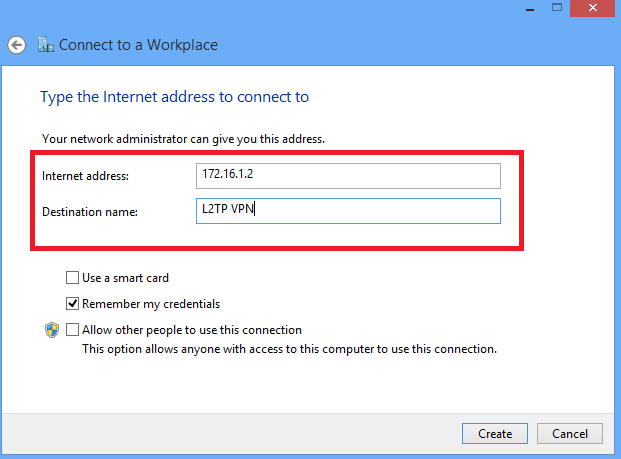
##### <span style="font-size: 10.5pt; font-family: Arial; color: #58585b; background-color: transparent; font-weight: 400; font-style: normal; font-variant: normal; text-decoration: none; vertical-align: baseline; white-space: pre-wrap;">**5**. Enter IP address of ASA's WAN interface or FQDN and any name for VPN adapter which is locally significant and click </span><span style="font-size: 10.5pt; font-family: inherit; color: #58585b; background-color: transparent; font-weight: bold; font-style: normal; font-variant: normal; text-decoration: none; vertical-align: baseline; white-space: pre-wrap;">Create.</span>

<span style="font-size: 10.5pt; font-family: inherit; color: #6f53bc; background-color: transparent; font-weight: 400; font-style: normal; font-variant: normal; text-decoration: none; vertical-align: baseline; white-space: pre-wrap;"><span style="border: none; display: inline-block; overflow: hidden; width: 517px; height: 382px;">[![image6.png](https://wiki.rackcorp.com/uploads/images/gallery/2022-01/scaled-1680-/NWIKaf1vqbRguom4-image6.png)](https://wiki.rackcorp.com/uploads/images/gallery/2022-01/NWIKaf1vqbRguom4-image6.png)</span></span>

---

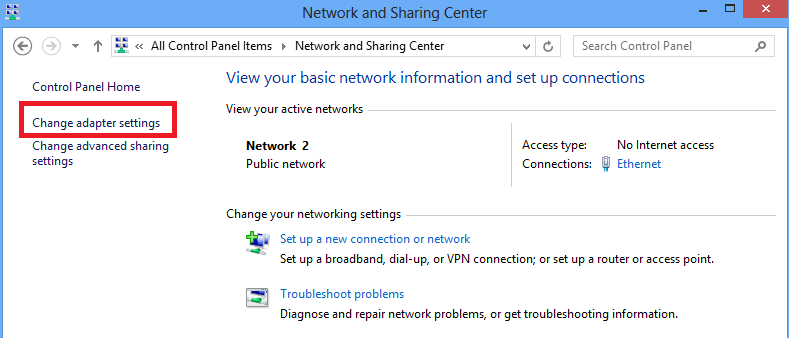
##### <span style="font-size: 10.5pt; font-family: Arial; color: #58585b; background-color: transparent; font-weight: 400; font-style: normal; font-variant: normal; text-decoration: none; vertical-align: baseline; white-space: pre-wrap;">**6**. On Network and Sharing Center, choose </span><span style="font-size: 10.5pt; font-family: inherit; color: #58585b; background-color: transparent; font-weight: bold; font-style: normal; font-variant: normal; text-decoration: none; vertical-align: baseline; white-space: pre-wrap;">Change adapter settings</span><span style="font-size: 10.5pt; font-family: Arial; color: #58585b; background-color: transparent; font-weight: 400; font-style: normal; font-variant: normal; text-decoration: none; vertical-align: baseline; white-space: pre-wrap;"> option on the left pane of the window.</span>

<span style="font-size: 10.5pt; font-family: inherit; color: #6f53bc; background-color: transparent; font-weight: 400; font-style: normal; font-variant: normal; text-decoration: none; vertical-align: baseline; white-space: pre-wrap;"><span style="border: none; display: inline-block; overflow: hidden; width: 524px; height: 224px;">[![image5.png](https://wiki.rackcorp.com/uploads/images/gallery/2022-01/scaled-1680-/msJaMkM3WtjPnHC9-image5.png)](https://wiki.rackcorp.com/uploads/images/gallery/2022-01/msJaMkM3WtjPnHC9-image5.png)</span></span>

---

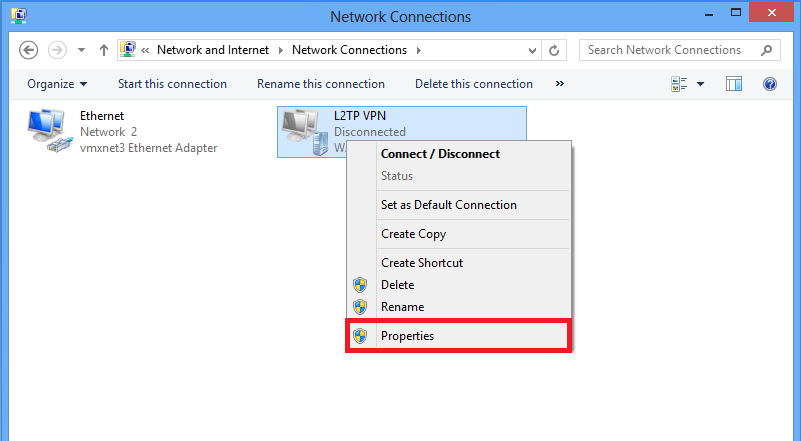
##### <span style="font-size: 10.5pt; font-family: Arial; color: #58585b; background-color: transparent; font-weight: 400; font-style: normal; font-variant: normal; text-decoration: none; vertical-align: baseline; white-space: pre-wrap;">**7**. Right click the recently created adapterfor L2TP VPN and choose </span><span style="font-size: 10.5pt; font-family: inherit; color: #58585b; background-color: transparent; font-weight: bold; font-style: normal; font-variant: normal; text-decoration: none; vertical-align: baseline; white-space: pre-wrap;">Properties.</span>

<span style="font-size: 10.5pt; font-family: inherit; color: #6f53bc; background-color: transparent; font-weight: 400; font-style: normal; font-variant: normal; text-decoration: none; vertical-align: baseline; white-space: pre-wrap;"><span style="border: none; display: inline-block; overflow: hidden; width: 523px; height: 288px;">[![image13.png](https://wiki.rackcorp.com/uploads/images/gallery/2022-01/scaled-1680-/QxogeyEtgqinZEzU-image13.png)](https://wiki.rackcorp.com/uploads/images/gallery/2022-01/QxogeyEtgqinZEzU-image13.png)</span></span>

---

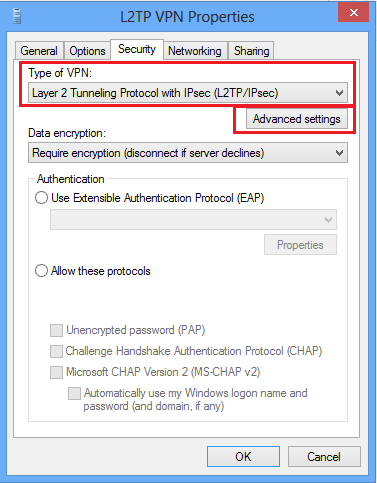
##### <span style="font-size: 10.5pt; font-family: Arial; color: #58585b; background-color: transparent; font-weight: 400; font-style: normal; font-variant: normal; text-decoration: none; vertical-align: baseline; white-space: pre-wrap;">**8**. Navigate to </span><span style="font-size: 10.5pt; font-family: inherit; color: #58585b; background-color: transparent; font-weight: bold; font-style: normal; font-variant: normal; text-decoration: none; vertical-align: baseline; white-space: pre-wrap;">Security</span><span style="font-size: 10.5pt; font-family: Arial; color: #58585b; background-color: transparent; font-weight: 400; font-style: normal; font-variant: normal; text-decoration: none; vertical-align: baseline; white-space: pre-wrap;"> tab, choose the Type of VPN as </span><span style="font-size: 10.5pt; font-family: inherit; color: #58585b; background-color: transparent; font-weight: bold; font-style: normal; font-variant: normal; text-decoration: none; vertical-align: baseline; white-space: pre-wrap;">Layer 2 Tunneling Protocol with IPsec (L2TP/IPsec)</span><span style="font-size: 10.5pt; font-family: Arial; color: #58585b; background-color: transparent; font-weight: 400; font-style: normal; font-variant: normal; text-decoration: none; vertical-align: baseline; white-space: pre-wrap;"> and then click on </span><span style="font-size: 10.5pt; font-family: inherit; color: #58585b; background-color: transparent; font-weight: bold; font-style: normal; font-variant: normal; text-decoration: none; vertical-align: baseline; white-space: pre-wrap;">Advanced settings.</span>

<span style="font-size: 10.5pt; font-family: inherit; color: #6f53bc; background-color: transparent; font-weight: 400; font-style: normal; font-variant: normal; text-decoration: none; vertical-align: baseline; white-space: pre-wrap;"><span style="border: none; display: inline-block; overflow: hidden; width: 264px; height: 338px;">[![image2.png](https://wiki.rackcorp.com/uploads/images/gallery/2022-01/scaled-1680-/w1LkvOzJttDWQiZl-image2.png)](https://wiki.rackcorp.com/uploads/images/gallery/2022-01/w1LkvOzJttDWQiZl-image2.png)</span></span>

---

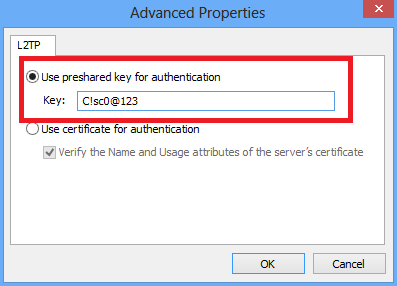
##### <span style="font-size: 10.5pt; font-family: Arial; color: #58585b; background-color: transparent; font-weight: 400; font-style: normal; font-variant: normal; text-decoration: none; vertical-align: baseline; white-space: pre-wrap;">**9**. Enter the preshared key as the same mentioned in tunnel-group </span><span style="font-size: 10.5pt; font-family: inherit; color: #58585b; background-color: transparent; font-weight: bold; font-style: normal; font-variant: normal; text-decoration: none; vertical-align: baseline; white-space: pre-wrap;">DefaultRAGroup</span><span style="font-size: 10.5pt; font-family: Arial; color: #58585b; background-color: transparent; font-weight: 400; font-style: normal; font-variant: normal; text-decoration: none; vertical-align: baseline; white-space: pre-wrap;"> and click </span><span style="font-size: 10.5pt; font-family: inherit; color: #58585b; background-color: transparent; font-weight: bold; font-style: normal; font-variant: normal; text-decoration: none; vertical-align: baseline; white-space: pre-wrap;">OK</span><span style="font-size: 10.5pt; font-family: Arial; color: #58585b; background-color: transparent; font-weight: 400; font-style: normal; font-variant: normal; text-decoration: none; vertical-align: baseline; white-space: pre-wrap;">. In this example, C!sc0@123 is used as the pre-shared key.</span>

[![image1.png](https://wiki.rackcorp.com/uploads/images/gallery/2022-01/scaled-1680-/UfVFQbKGIGY5bSn5-image1.png)](https://wiki.rackcorp.com/uploads/images/gallery/2022-01/UfVFQbKGIGY5bSn5-image1.png)

---

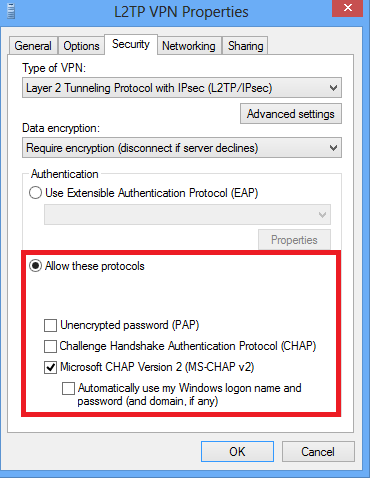
##### <span style="font-size: 10.5pt; font-family: Arial; color: #58585b; background-color: transparent; font-weight: 400; font-style: normal; font-variant: normal; text-decoration: none; vertical-align: baseline; white-space: pre-wrap;">**10.** Choose the authentication method as Allow these protocols and ensure that only  
"</span><span style="font-size: 10.5pt; font-family: inherit; color: #58585b; background-color: transparent; font-weight: bold; font-style: normal; font-variant: normal; text-decoration: none; vertical-align: baseline; white-space: pre-wrap;">Microsoft CHAP Version 2 (MS-CHAP v2)</span><span style="font-size: 10.5pt; font-family: Arial; color: #58585b; background-color: transparent; font-weight: 400; font-style: normal; font-variant: normal; text-decoration: none; vertical-align: baseline; white-space: pre-wrap;"> checkbox is checked and click </span><span style="font-size: 10.5pt; font-family: inherit; color: #58585b; background-color: transparent; font-weight: bold; font-style: normal; font-variant: normal; text-decoration: none; vertical-align: baseline; white-space: pre-wrap;">OK</span><span style="font-size: 10.5pt; font-family: Arial; color: #58585b; background-color: transparent; font-weight: 400; font-style: normal; font-variant: normal; text-decoration: none; vertical-align: baseline; white-space: pre-wrap;">.</span>

[![image3.png](https://wiki.rackcorp.com/uploads/images/gallery/2022-01/scaled-1680-/nZQCcA99kXSb5U3e-image3.png)](https://wiki.rackcorp.com/uploads/images/gallery/2022-01/nZQCcA99kXSb5U3e-image3.png)

---

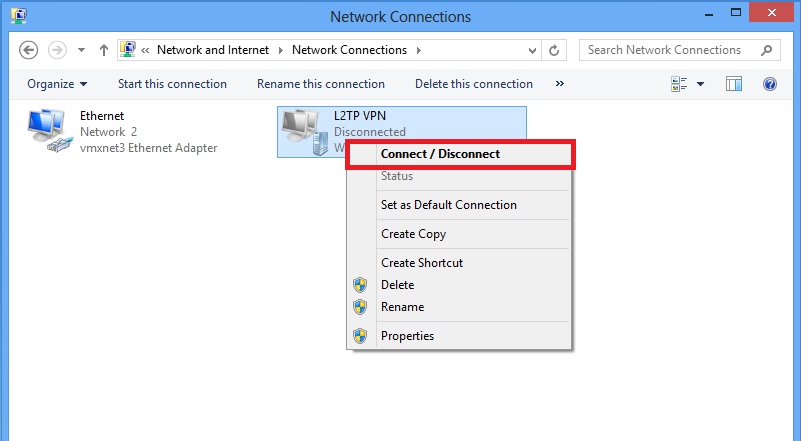
##### <span style="font-size: 10.5pt; font-family: Arial; color: #58585b; background-color: transparent; font-weight: 400; font-style: normal; font-variant: normal; text-decoration: none; vertical-align: baseline; white-space: pre-wrap;">**11**. Under network connections, right click on L2TP VPN adapter and choose </span><span style="font-size: 10.5pt; font-family: inherit; color: #58585b; background-color: transparent; font-weight: bold; font-style: normal; font-variant: normal; text-decoration: none; vertical-align: baseline; white-space: pre-wrap;">Connect/Disconnect.</span>

<span style="font-size: 10.5pt; font-family: inherit; color: #6f53bc; background-color: transparent; font-weight: 400; font-style: normal; font-variant: normal; text-decoration: none; vertical-align: baseline; white-space: pre-wrap;"><span style="border: none; display: inline-block; overflow: hidden; width: 706px; height: 389px;">[![image10.png](https://wiki.rackcorp.com/uploads/images/gallery/2022-01/scaled-1680-/a2i5Za3Y52hZdj2J-image10.png)](https://wiki.rackcorp.com/uploads/images/gallery/2022-01/a2i5Za3Y52hZdj2J-image10.png)</span></span>

---

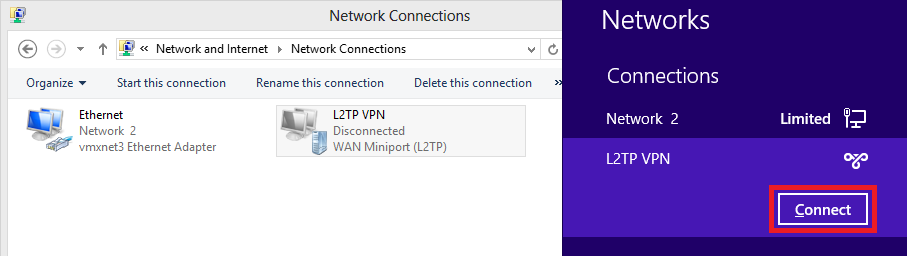
##### <span style="font-size: 10.5pt; font-family: Arial; color: #58585b; background-color: transparent; font-weight: 400; font-style: normal; font-variant: normal; text-decoration: none; vertical-align: baseline; white-space: pre-wrap;">**12**. Networks icon will pop up and click <span style="font-size: 10.5pt; font-family: inherit; color: #58585b; background-color: transparent; font-weight: bold; font-style: normal; font-variant: normal; text-decoration: none; vertical-align: baseline; white-space: pre-wrap;">Connect</span><span style="font-size: 10.5pt; font-family: Arial; color: #58585b; background-color: transparent; font-weight: 400; font-style: normal; font-variant: normal; text-decoration: none; vertical-align: baseline; white-space: pre-wrap;"> on L2TP VPN connection.</span></span>

<span style="font-size: 10.5pt; font-family: inherit; color: #6f53bc; background-color: transparent; font-weight: 400; font-style: normal; font-variant: normal; text-decoration: none; vertical-align: baseline; white-space: pre-wrap;"><span style="border: none; display: inline-block; overflow: hidden; width: 711px; height: 201px;">[![image7.png](https://wiki.rackcorp.com/uploads/images/gallery/2022-01/scaled-1680-/zXE7yR9grUt5NGoJ-image7.png)](https://wiki.rackcorp.com/uploads/images/gallery/2022-01/zXE7yR9grUt5NGoJ-image7.png)</span></span>

---

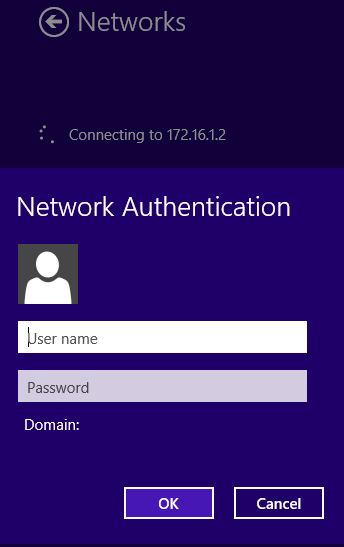
##### <span style="font-size: 10.5pt; font-family: Arial; color: #58585b; background-color: transparent; font-weight: 400; font-style: normal; font-variant: normal; text-decoration: none; vertical-align: baseline; white-space: pre-wrap;">**13**. Enter the user credentials and click <span style="font-size: 10.5pt; font-family: inherit; color: #58585b; background-color: transparent; font-weight: bold; font-style: normal; font-variant: normal; text-decoration: none; vertical-align: baseline; white-space: pre-wrap;">OK</span><span style="font-size: 10.5pt; font-family: Arial; color: #58585b; background-color: transparent; font-weight: 400; font-style: normal; font-variant: normal; text-decoration: none; vertical-align: baseline; white-space: pre-wrap;">.</span></span>

<span style="font-size: 10.5pt; font-family: inherit; color: #6f53bc; background-color: transparent; font-weight: 400; font-style: normal; font-variant: normal; text-decoration: none; vertical-align: baseline; white-space: pre-wrap;"><span style="border: none; display: inline-block; overflow: hidden; width: 175px; height: 278px;">[![image4.png](https://wiki.rackcorp.com/uploads/images/gallery/2022-01/scaled-1680-/WU4KwGkAI4E4XJKJ-image4.png)](https://wiki.rackcorp.com/uploads/images/gallery/2022-01/WU4KwGkAI4E4XJKJ-image4.png)</span></span>